Many growing businesses in India run their day-to-day operations in Odoo: sales, purchase, inventory, and banking. But when it comes to accounting, GST returns, and audits, they still rely on TallyPrime, simply because their accountants and auditors know and trust it.
The result? Every sales invoice, vendor bill, and payment created in Odoo has to be typed in again in Tally. That double entry costs hours every week and opens the door to mistakes in amounts, tax, and party names.
VeeVee Infotech's Odoo to TallyPrime Integration removes that repeated work. You create the transaction once in Odoo, and it is synced to Tally automatically, with ledgers, items, and GST details in place.
It works with all three Odoo deployments: Odoo Online, Odoo.sh, and On-Premise. It was also built by a team with 16 years of hands-on Tally experience, so the data lands in Tally the way an accountant expects it.
Buy Now – Odoo to Tally (OTT) Subscription Enquire Now – Fill Your Details
Watch the Demo Video
In this video, we create sales, purchase, journal, and bank transactions in Odoo and show them appearing in TallyPrime's Day Book within seconds.
What the Integration Syncs
The tool is built around the accounting data your team would otherwise enter manually in Tally:
- Automatic ledger creation: customer and vendor ledgers are created in Tally when needed, so your accountant doesn't have to set them up first.
- Automatic item creation: products and services used in Odoo transactions are created as stock or service items in Tally.
- Accounting vouchers: Sales, Purchase, Payment, Receipt, Journal, Debit Note, and Credit Note vouchers are synced from Odoo to Tally.
Transaction-driven, not record-dumping
The integration is transaction-focused. Creating a contact or product in Odoo does not, on its own, push anything to Tally. The customer, vendor, or product is sent along with the first transaction that uses it.
This keeps your Tally company clean. It contains only the parties and items that actually appear in your books, not every test record or unused product from Odoo.
Works with Odoo Online, Odoo.sh and On-Premise
Many Odoo–Tally integration tools only work with Odoo.sh or self-hosted (on-premise) Odoo, because they rely on installing custom modules on the server. That leaves out businesses on Odoo Online (SaaS), which is often the most popular choice for small and mid-sized companies.
VeeVee's integration supports all three:
| Odoo Deployment | Supported |
| Odoo Online (SaaS) | ✅ Yes |
| Odoo.sh | ✅ Yes |
| Odoo On-Premise (your own server) | ✅ Yes |
This means:
- No need to migrate away from Odoo Online just to connect with Tally.
- Freedom to change later. If you move from Odoo Online to Odoo.sh or your own server, the integration comes with you.
- One solution for all your group companies, even if they run on different Odoo setups.
Built by a Team with 16 Years of Tally Experience
An integration is only as good as its understanding of Tally. Our team has 16 years of hands-on experience with Tally: implementing it, customising it, and supporting accountants who use it every day.
That experience is built into how the tool works:
- Ledgers are created under the correct groups (Sundry Debtors, Sundry Creditors, Sales, Purchase, Duties & Taxes, and so on), with party details such as address and GSTIN.
- Items are created with the right units and HSN/SAC details, so inventory and GST reports stay accurate.
- Vouchers follow Tally's own voucher types and structure, so they look exactly as your accountant would have entered them.
- GST reports are kept in mind throughout. Tax ledgers, HSN codes, and party GST details are posted correctly, so GSTR-1, GSTR-3B, and other GST reports in Tally work without cleanup.
Your accountant keeps working in a Tally company that looks and behaves the way they know, just without the manual typing.
Before You Start: Contacts, Products and HSN/SAC Codes
Good data in Odoo means good data in Tally. Before creating transactions, check the following:
Contacts. Fill in the name, email, phone, full address, and GST treatment (registered business, consumer, and so on), along with the GSTIN where applicable. These details flow into the Tally ledger. In the demo, we created a customer called Aria Infotech as a consumer with no GSTIN.
Products. Create products from the Sales, Purchase, or Inventory app. Set the correct product type:
- Service, for items such as Service Charges
- Goods, for physical items like laptops, TVs, or mobile phones (these follow inventory tracking)
Add the sales price, cost, unit of measure, and default taxes.
HSN/SAC codes. Odoo shows a warning on the invoice if a product's HSN/SAC code is missing. Add the code on the product before confirming the invoice, so GST details reach Tally correctly.
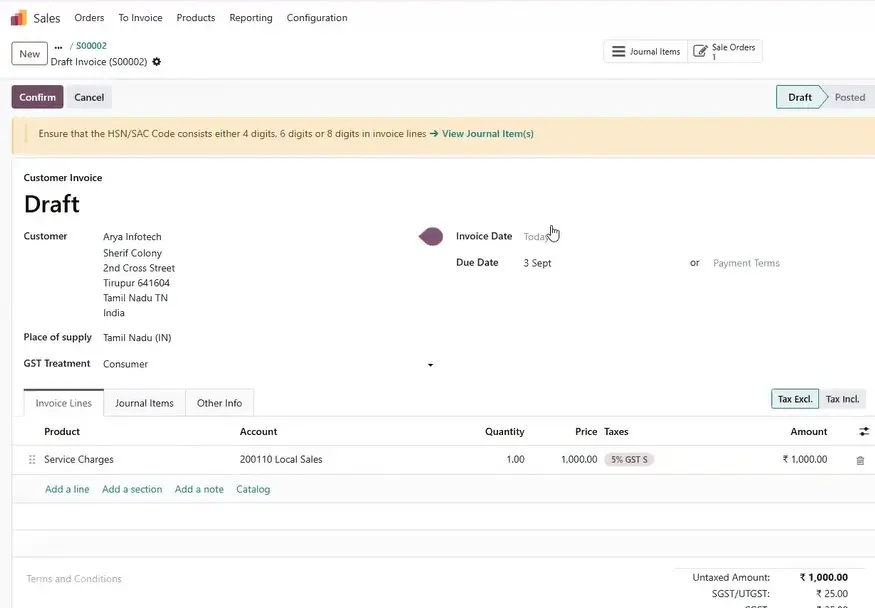
Sales Invoices: From Odoo to Tally
This is the most-used part of the integration.
- In Sales, create a quotation and select the customer.
- Add the delivery date and payment terms.
- Add products. The price and tax are pulled from the product automatically.
- Confirm the quotation to convert it into a sales order.
- Click Create Invoice, verify the details and invoice date, then Confirm.
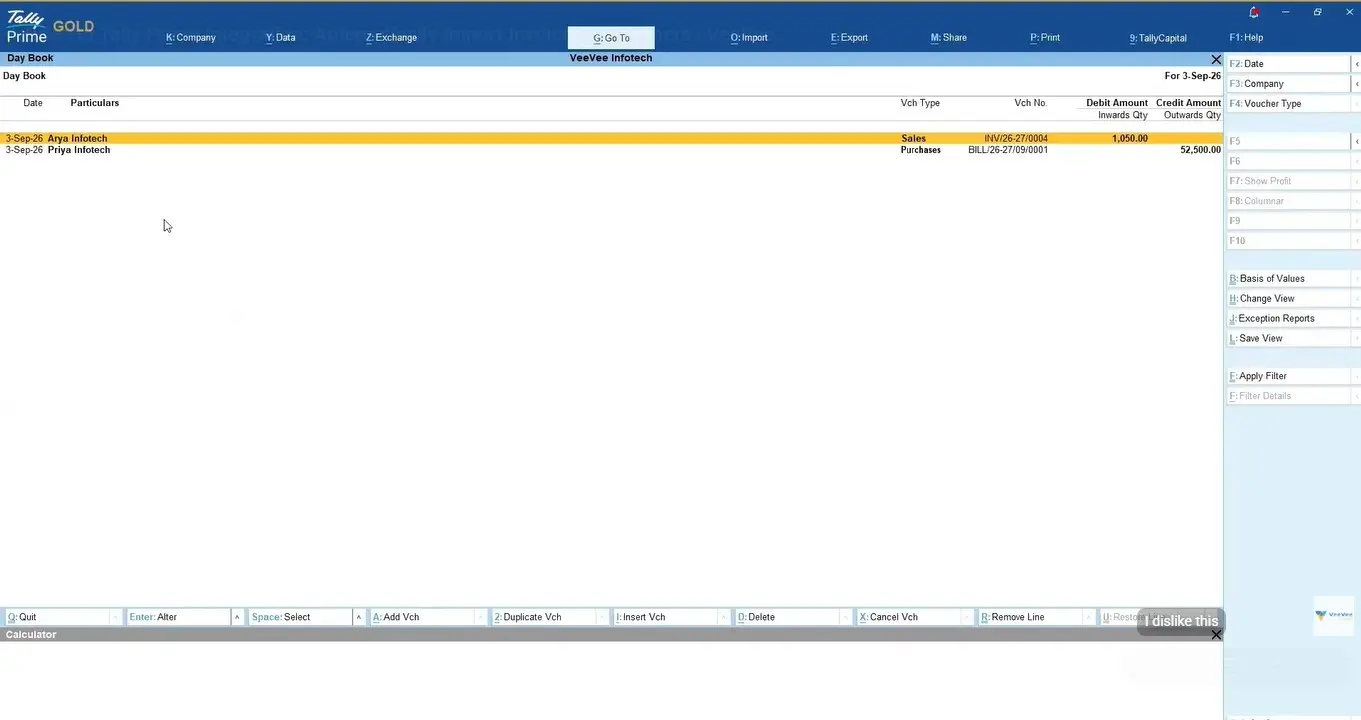
Once the invoice is confirmed, the integration picks it up and sends the customer, items, quantity, rate, taxes, and invoice amount to Tally, using your configured mapping.
In TallyPrime, open Day Book and the sales voucher is already there. It shows the party ledger, sales ledger, item, quantity, rate, amount, and CGST/SGST split, exactly as your accountant would have entered it.
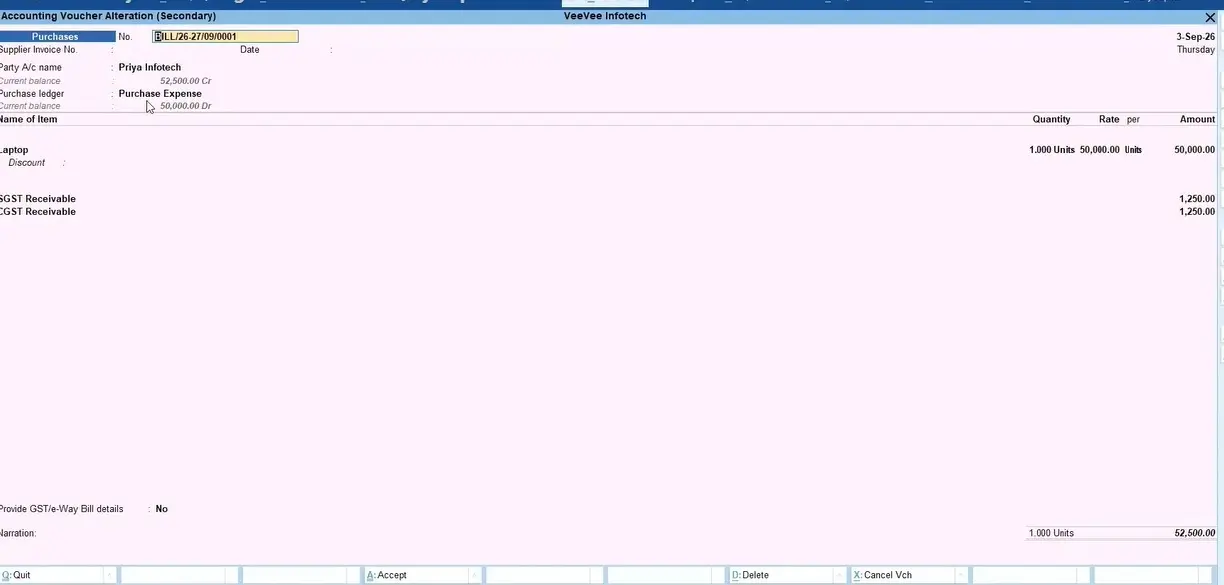
Purchase Orders and Vendor Bills
The purchase flow works the same way:
- Create or select the vendor, then click Purchase → New.
- Add the vendor reference and products (for example, a Laptop).
- Confirm the order and Receive the goods by validating the receipt.
- Create the Vendor Bill, attach the supplier's original bill, set the bill date, and Confirm.
The bill appears in Tally as a Purchase voucher. The purchase ledger is taken from the expense or purchase account used in Odoo. If you use a different account in Odoo, the matching ledger is used in Tally.
Journal Entries
Journal entries cover adjustments, expenses, and other non-trade transactions.
In Odoo, go to Accounting → Miscellaneous Operations → New. Add a reference and narration, such as Travelling expense – Arjun. Debit the expense account (₹1,000 in the demo), credit the appropriate account (a payable, bank, or cash account), then Post the entry.
In TallyPrime, the entry appears as a Journal voucher on the same date, with the debit, credit, and narration intact.
Payments and Receipts (Bank & Cash)
Bank and cash transactions from Odoo are synced as Receipt and Payment vouchers.
In the demo, we added a bank statement line in an HDFC Bank journal for a ₹1,050 payment received from a customer. Odoo matched it against the open invoice and reconciled it automatically. If your bank feed is connected to Odoo, these lines arrive on their own.
In Tally, the receipt shows under the HDFC Bank ledger with the correct party, amount, and narration. Cash transactions work the same way through a cash journal in Odoo.
Vendor payments sync as Payment vouchers, and customer returns or price corrections sync as Credit Notes and Debit Notes. Your receivables and payables stay aligned in both systems.
Chart of Accounts and Ledger Mapping
Mapping is the bridge between Odoo and Tally. During setup, Odoo accounts are mapped to Tally ledgers, for example:
| Odoo Account | Tally Ledger |
| Product Sales | Sales Account |
| Purchase Expense | Purchase Account |
| Account Receivable | Customer (Sundry Debtors) |
| Account Payable | Vendor (Sundry Creditors) |
| Bank – HDFC | HDFC Bank |
| Cash | Cash |
| Output/Input CGST, SGST, IGST | GST Duty Ledgers |
| Expense accounts | Indirect Expense Ledgers |
Once the mapping is configured, every voucher lands in the correct ledger without manual checking.
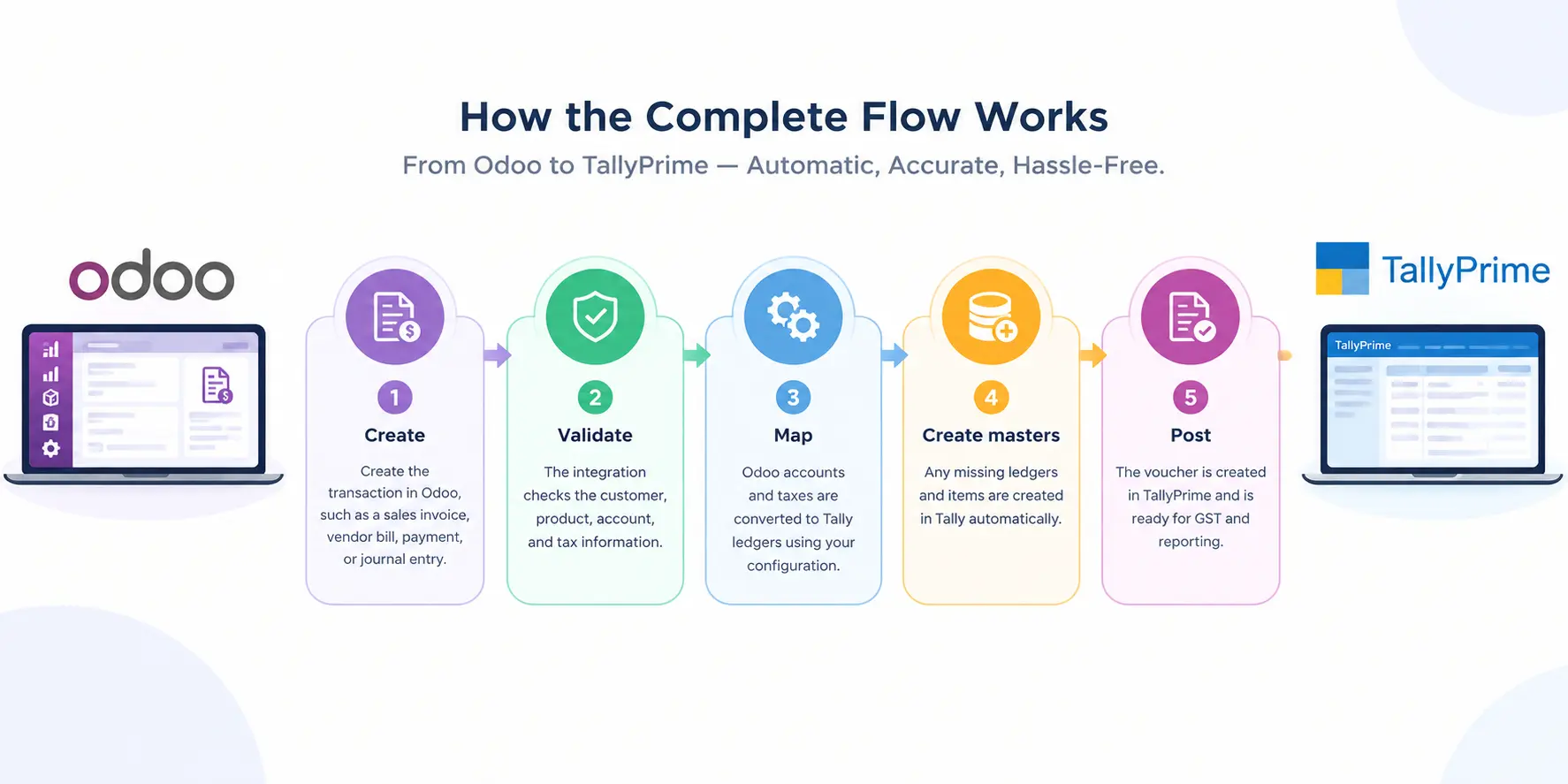
How the Complete Flow Works
- Create the transaction in Odoo, such as a sales invoice, vendor bill, payment, or journal entry.
- Validate: the integration checks the customer, product, account, and tax information.
- Map: Odoo accounts and taxes are converted to Tally ledgers using your configuration.
- Create masters: any missing ledgers and items are created in Tally automatically.
- Post: the voucher is created in TallyPrime and is ready for GST and reporting.
Benefits for Your Business
- No duplicate data entry. Each transaction is entered once, in Odoo.
- Time saved for both the accounting and operations teams.
- Fewer errors in amounts, taxes, and party names.
- Best of both systems. Odoo runs your operations, while Tally stays with your accountant for GST and statutory work.
- Clean Tally books. Only the ledgers and items used in real transactions are created.
- Works on any Odoo deployment: Odoo Online, Odoo.sh, or On-Premise.
- Built by Tally experts. With 16 years of Tally experience behind it, the tool handles ledgers, items, vouchers, and GST reports the way Tally users expect.
Subscribe Now Talk to Our Team About Your Setup: Submit an Enquiry
Frequently Asked Questions
Which vouchers are supported?
Sales, Purchase, Payment, Receipt, Journal, Debit Note, and Credit Note.
Do I need to create ledgers and items in Tally first?
No. Ledgers and items are created automatically in Tally when a transaction needs them.
Does GST information transfer to Tally?
Yes. Tax amounts such as CGST and SGST are posted to the mapped GST ledgers. Make sure HSN/SAC codes and GST details are filled in Odoo.
Will every contact and product I create in Odoo be pushed to Tally?
No. Masters are synced only when they are used in a transaction, which keeps your Tally company clean.
Can I use my existing chart of accounts in Tally?
Yes. During setup, we map your Odoo accounts to your existing Tally ledgers.
Does it work with Odoo Online, or only Odoo.sh and on-premise?
It works with all three: Odoo Online (SaaS), Odoo.sh, and Odoo On-Premise. Many other tools support only Odoo.sh or on-premise.
Who built this tool?
VeeVee Infotech, a team with 16 years of Tally experience. The tool is designed around how Tally handles ledgers, items, vouchers, and GST reports.
How do I buy the tool?
You can subscribe directly from our online shop:Odoo to Tally (OTT) Subscription
How do I check compatibility with my Odoo version and TallyPrime setup?
Submit an enquiry with your Odoo version and TallyPrime details, and we'll confirm the setup for you.
Get Started
If your team is still entering Odoo transactions into Tally by hand, it's time to stop. Create once in Odoo, sync to Tally, and let your accountant focus on reviewing numbers instead of typing them.
Buy the Odoo to Tally (OTT) Subscription
Ready to start? Subscribe directly from our online shop and our team will help you with the setup.
Enquire About the Odoo to TallyPrime Integration
Click the link below and fill in your details. Our team will contact you to understand your Odoo setup and arrange a demo.
Want to see the full feature list first? Visit the Odoo to Tally Integration product page or watch the demo video on YouTube
VeeVee Infotech: Odoo and Tally implementation, customisation, and integration.
Our Most Popular Reads